Your bill
What it does
Section titled “What it does”Your bill is the live bill for your stay: room nights, dining, services, the GST on each, and every payment. Tap any line to see what it is, when it was posted and by whom. You can pay the balance online, use Upstay Credit, ask the desk to settle it, or check out from the phone once nothing is due. The Tax invoice is one tap away.
Who can use it
Section titled “Who can use it”The primary guest, from check-in through checkout and after.
Where to find it
Section titled “Where to find it”The bill tile on your stay page, Open Bill & Checkout on the Day Arc’s checkout marker, View Bill in My Account, or Ask with bill.
How to read the bill
Section titled “How to read the bill”- The top shows Balance due (or Nothing due) with the total and what is paid.
- Lines are grouped: Room, Food & beverage, Services, then Taxes, Total charges and Payments.
- Tap a line. The sheet shows What, Category, When, Posted by and the split Before GST, CGST, SGST, With GST. A tax line explains the rate and the SAC code.
- Something wrong? Tap Question About This Line; the desk corrects it with a dated adjustment.
How to pay
Section titled “How to pay”- Tap Pay Online · {amount}. The sheet shows Balance due, any Upstay Credit applied, and To pay.
- Pick UPI, Card or Netbanking and tap Pay {amount}. The secure page opens; the hotel never sees your card or UPI PIN.
- Back on the bill, the payment reads Confirming until the bank confirms it, then it is counted.
- To pay at the desk instead, tap I’ll Pay at the Desk.
How to use Upstay Credit
Section titled “How to use Upstay Credit”- Signed in to your Upstay account with credit, switch on Use Upstay Credit · {amount} available.
- The credit pays part (or all) of the balance. GST on every line stays the same: credit is a payment, not a discount.
- If the credit covers the whole balance, Pay with Credit · {amount} needs no card or UPI.
How to check out
Section titled “How to check out”- With a balance, tap Request Checkout · the desk settles it. The desk takes the payment at the desk.
- With nothing due, tap Check Out, then Check Out Now. Your room key stops working straight away.
- Leaving soon? books the luggage hold and the airport cab for checkout day: Hold Luggage + Book Cab.
When the hosts pay for your room
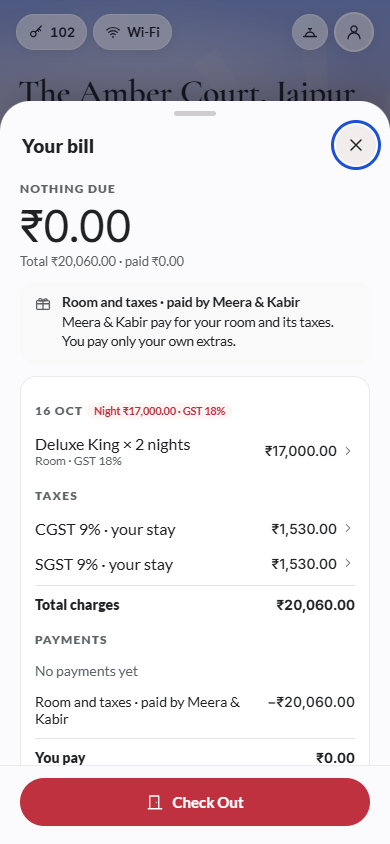
Section titled “When the hosts pay for your room”If you are staying for a wedding or event and the hosts are paying for the rooms, your bill shows it:
- The top reads You pay with only your own share, for example your dining and extras.
- A note says Room and taxes · paid by the hosts: they pay for your room and its taxes, and you pay only your own extras.
- Under Payments, the line Room and taxes · paid by the hosts takes their share off, and You pay shows what is left for you.
- Pay Online and I’ll Pay at the Desk charge only your share. With nothing of your own to pay, Check Out works straight away.
The room and taxes are sent to the hosts as their bill when you check out.
How to get the invoice
Section titled “How to get the invoice”- Tap View Invoice. Before checkout it is a Receipt; at checkout the hotel issues the numbered Tax invoice with its GSTIN.
- Tap Download PDF or Email Me a Copy.
Tips & good to know
Section titled “Tips & good to know”- Room nights above ₹7,500 are taxed at 18%, up to ₹7,500 at 5%; GST is split equally between CGST and SGST.
- Leaving before your checkout date? Nights you don’t stay are still billed as booked. Ask the desk.
- A pending payment is Not counted in your balance until the bank confirms.
Troubleshooting
Section titled “Troubleshooting”- “Online payment is not available right now. Pay at the desk.” → The hotel is not taking online payments at the moment.
- “Payment failed. Try another method.” → Try UPI or a different card, or pay at the desk.
- “Upstay Credit could not be applied here yet. The desk can apply it.” → Sign in to your account, or ask the desk.
- “We have no email for you. Give one at the desk and ask again.” → The invoice could not be emailed.