The host's page
What it does
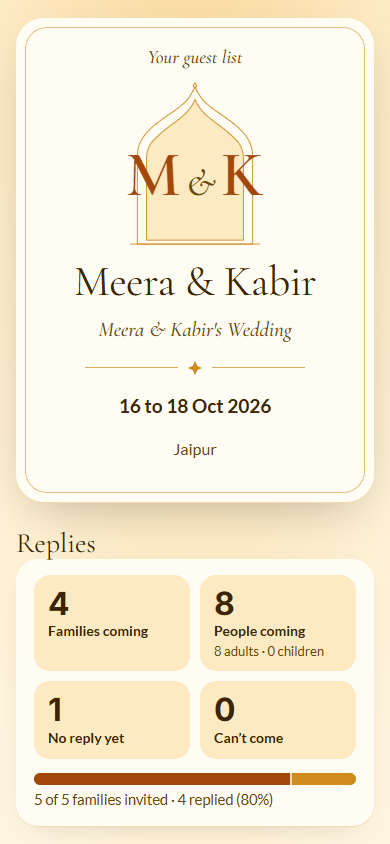
Section titled “What it does”Your planner can send you, the family hosting the event, a link to Your guest list: a live page with the numbers you would otherwise call them for. It shows:
- Replies: Families coming, People coming (adults and children), No reply yet and Can’t come, with how many families were invited and replied.
- Functions: each function’s day, time and venue, with how many said yes, maybe and no, and how many have arrived once the door starts checking people in.
- Arrivals: who arrives on each day, when, and by which flight or train.
- Families: every family with their side, hotel and arrival, and whether they are coming. Search by family, side or hotel.
- Hotels: how many families and rooms are booked at each hotel.
- Guest requests: how many are Being looked after and Done.
- Latest updates the planner sent to guests.
The page is read-only: the planner makes every change.
Who can use it
Section titled “Who can use it”The people your planner sends a host link to. A link may show both sides or only one side, for example Showing the Bride’s side only.
Where to find it
Section titled “Where to find it”The link your planner sends you on WhatsApp. After you open it once, it opens on that phone without the link.
How to see your guest list
Section titled “How to see your guest list”- Open the link from your planner’s message.
- Read Replies at the top, then scroll for Functions, Arrivals, Families and Hotels.
- Type in the search box under Families to find a family, a side or a hotel.
Tips & good to know
Section titled “Tips & good to know”- The page updates by itself while it is open, and again when you come back to it.
- Nothing you do here changes the event. To change something, call or message your planner.
- Each person in your family can have their own link. Ask the planner if someone else should see it.
Troubleshooting
Section titled “Troubleshooting”- “This link is not valid. Ask the planner for a new one.” → The planner switched the link off or made a new one. Ask them to send it again.
- “Your guest list opens here” → Open the link from your planner’s WhatsApp message once; it opens here every time after that.
- “No connection. Check your internet and try again.” → Check your internet connection.